
Pay your way with Flex Pay
Get extra funds fast
for your debit card purchases.*
Whether you have an upcoming purchase or want to spread out payments on one you’ve already made, Flex Pay can help you manage your cash flow and stay within your budget.

Plan Your Payment
Look for offers that provide funds in advance so you can make a purchase now and pay it back over time.

Split Your Payments
Find offers that let you make installment payments on eligible debit card purchases you’ve already made.
Download our mobile app for secure, on-the-go banking.



 Flex Pay How-To
The process is quick and easy:
- Log in to digital banking and find Flex Pay.
- Choose Plan Your Payment or Split Your Payments.
- View your pre-qualified offers and accept the terms for the option you want.
- Receive funds in your account in moments.
No credit check. No application. No hassle.
Have questions? We're always in your corner. Call 877.275.2228 for assistance.
Flex Pay FAQsMore About Flex Pay
Where can I find my Flex Pay offers?
You can find Flex Pay offers in CCU Digital Banking. Follow these steps:
1) Log in to CCU Digital Banking
2) Navigate to the Flex Pay selection: On mobile, go to the lower right-hand corner and look for "Menu" to click and scroll down to "More" and then "Flex Pay". On the desktop, go to the upper right-hand corner and look for the three dots, select and scroll down to "Flex Pay".
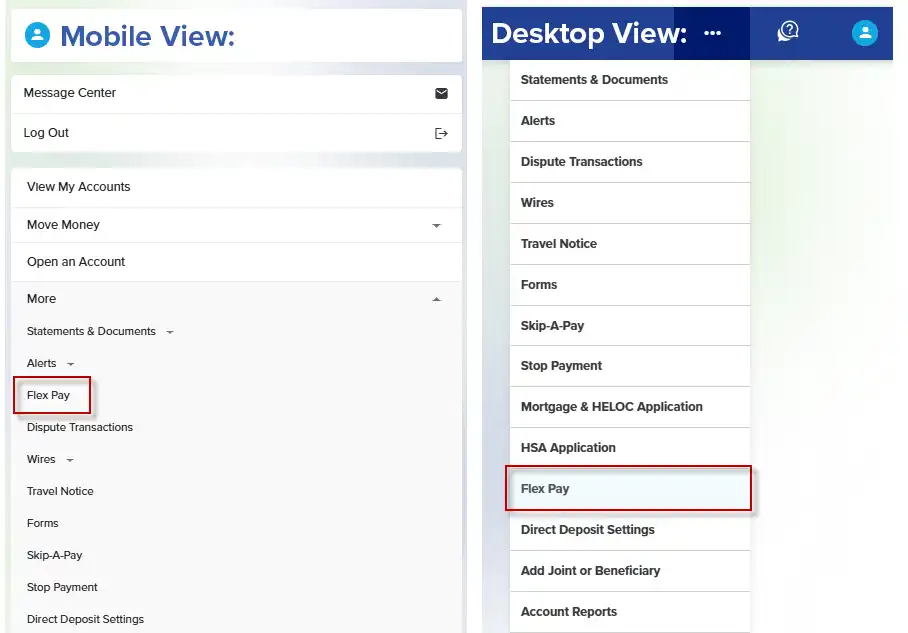
3) Select Flex Pay. Choose your option to either "Plan" or "Split" Your Payments.
Why can’t I see any Flex Pay offers?
If you do not see Flex Pay offers, it’s likely that your current account status or recent debit card purchases are not eligible. If you already have an active Flex Pay plan, you may not be eligible for additional offers until the active plan is paid in full.
What is an eligible purchase?
An eligible purchase is a debit card purchase made in the last 60 days that is at least $100 and was not a cash or cash equivalent purchase (e.g., ATM withdrawal, cash advance, etc.). Other restrictions related to the merchant type or transaction limits may also affect eligibility.
Does Flex Pay require a credit check?
No, Flex Pay offers are pre-qualified, so no credit check is required. However, Flex Pay plans will be reported to the credit bureaus, like all CCU loans.
How soon will I see my Flex Pay loan deposited in my account?
Funds are typically deposited into an eligible member's checking account within minutes. In some cases, however, this process may take up to 24 hours.
Can I pay off my Flex Pay plan early?
Yes. Flex Pay loans can be paid off at any time, with no pre-payment penalty.
Does my use of a Plan Your Payment loan affect the Split Your Payments offers available to me?
There are limits to the total combined dollar amount a member may have in Plan Your Payment and Split Your Payments loans. These limits are unique to each member’s financial relationship with CCU.
*Not all purchases will qualify. All offers are subject to approval. Some transactions do not qualify for Flex Pay plans, including ATM withdrawals, money transfer services, gambling, lottery tickets, casino gaming chips, racetrack wagers or similar betting transactions. Offers are valid on purchases made with your CCU Visa debit card. Other exclusions may apply, and offers are subject to change.